Introduction
Every video you save through the TikTok app comes with a watermark — the TikTok logo in the corner and the creator's username stamped across the video. For most people this is fine, but there are plenty of legitimate reasons to want a clean copy: editing your own content, personal archiving, or saving something before the account goes private.
This article covers three ways to save TikTok videos without a watermark. The first method takes under 30 seconds and works on any device. No account or app required.
Why TikTok adds a watermark in the first place
When you use TikTok's built-in download button, the app encodes its logo and the creator's username directly into the video file. This is intentional — TikTok wants its brand to travel with the content when people share it on other platforms.
The watermark is added when you save via the TikTok app — it is not part of the original recording. TikRapid gives you the clean version without the overlay, which is why the download comes out without any logo or username stamp.
- TikTok logo in corner
- Username overlaid on video
- Lower quality in some cases
- Only saves your own content cleanly
- No watermark at all
- No username overlay
- Original quality
- Works on any public video
Step-by-step: Save without watermark using TikRapid
This method works on iPhone, Android, Windows, and Mac. All you need is the video link and a browser.
-
Get the TikTok video link
Open TikTok and find the video you want to save. Tap the Share button — the arrow icon on the right side of the screen. From the share sheet that appears, tap Copy Link. The URL is now copied to your clipboard.
-
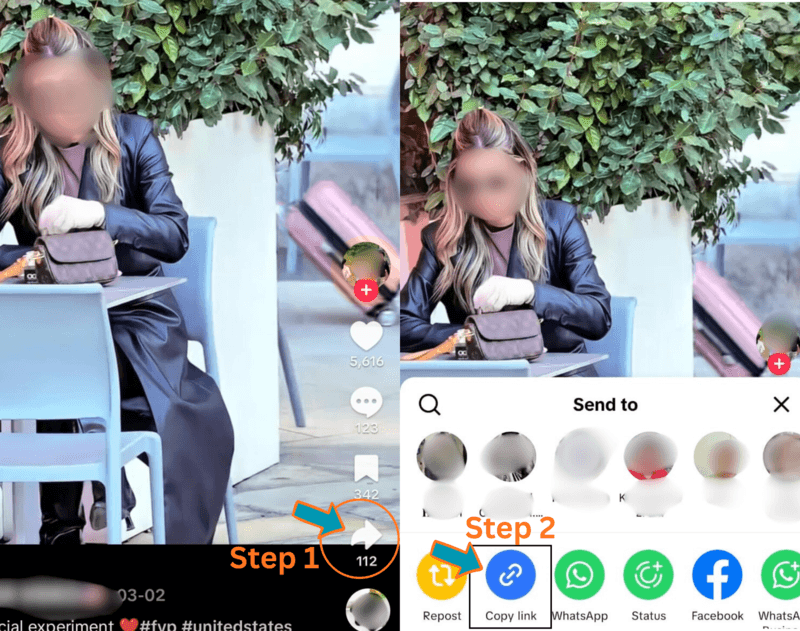
Screenshot showing TikTok Share button and Copy Link option -
Paste the link above
Scroll to the top of this page. Tap the Paste button — it reads from your clipboard automatically. Within a few seconds the video thumbnail and title appear, confirming the right video was found.
-
Choose No Watermark and download
You will see two or three download options. Tap the orange Download button next to No Watermark. Your browser handles the rest — the clean video file saves to your device automatically.
-
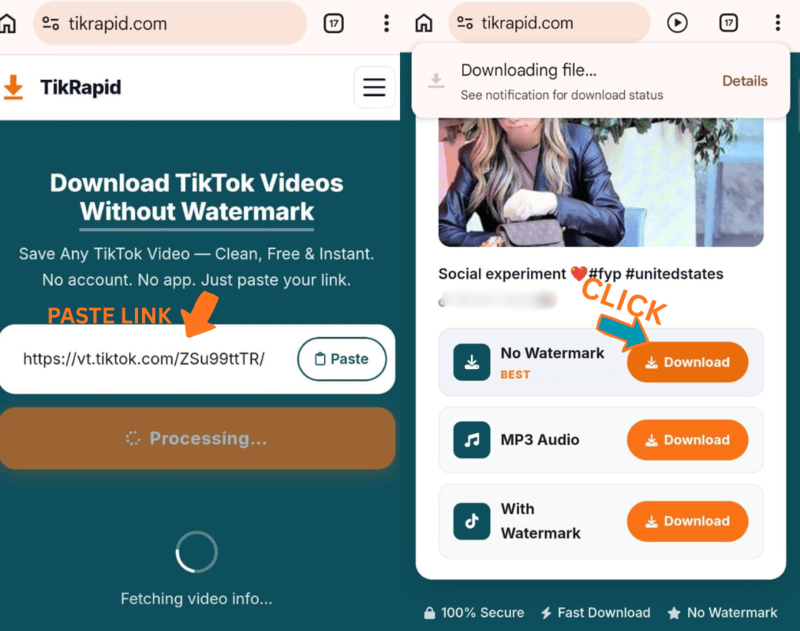
Screenshot showing TikRapid paste and download interface
Saving on iPhone and Android
The steps above work the same way on both platforms. The only difference is where the file ends up after downloading.
- Copy the link in TikTok app
- Open Safari — go to tikrapid.com
- Tap Paste in the input field
- Tap Download → No Watermark
- Tap Download in the Safari popup
- File saves to Files app → Downloads
- To move to Camera Roll: open Files, long-press the video, tap Share → Save Video
- Copy the link in TikTok app
- Open Chrome — go to tikrapid.com
- Tap Paste in the input field
- Tap Download → No Watermark
- File saves to Downloads folder
- Open your Gallery or Files app to find it
- Share directly to WhatsApp, Instagram, or any app
Saving your own TikTok videos without watermark
If you are the creator and want to save your own video without watermark, TikTok has a built-in option for this — but it is easy to miss.
From the TikTok app
Go to your video → tap the three-dot menu → select Save video. On some accounts this saves without the watermark, on others it still adds the logo. The result depends on your account settings and region.
From TikTok Studio (desktop)
Log into studio.tiktok.com → go to your video → click Download. Videos downloaded through TikTok Studio tend to have lighter or no watermark. This only works for your own uploaded content.
Common issues and how to fix them
The video still has a watermark after downloading
Make sure you tapped Download next to the No Watermark option specifically — not the With Watermark row. Each option downloads a different version of the file.
The link shows an error
Copy the link directly from TikTok using Share → Copy Link. Avoid sharing links from third-party apps or link shorteners — these sometimes strip the video ID from the URL. If the error persists, open the video in a browser and copy the address bar URL.
The video saves as a photo or wrong format
Some TikTok posts are photo slideshows rather than videos. If the post is a slideshow, TikRapid shows individual photo downloads instead of a video option. Check that your link points to an actual video post.
iPhone says it cannot open the file
Tap and hold the Download button and select Download Linked File from the menu. This forces Safari to save the file to your Files app rather than attempting to play it in the browser.
Is it legal to download TikTok videos without watermark?
Downloading publicly available TikTok videos for personal offline use is widely considered acceptable. Millions of people do it every day without issue.
Where it gets complicated is what you do with the video afterwards. Re-uploading someone else's content to YouTube or Instagram, using it in a monetised video, or presenting it as your own work can infringe on the original creator's rights and violate platform policies.
Ready to save your video?
Scroll up and paste your link — or go straight to the TikTok Video Downloader.